Best SSH key types and how to generate them

Consider this: the algorithm behind RSA was designed in 1977, and until October 2023 RSA was still the key type ssh-keygen created if you did not ask for anything else.
This guide compares the SSH key types you can use in 2026, explains what OpenSSH has deprecated and shows the ssh-keygen options you are most likely to need. Let’s take a look at what’s available:
TL;DR (too long; didn't read): We suggest using Ed25519 for all new SSH keys, unless you need to reach systems that cannot accept them (Linux distributions older than about 2014, Windows instances on Amazon EC2 or some older network equipment), in which case use RSA keys of 3072 bits or more. DSA keys no longer work with current versions of OpenSSH and should be replaced. See how to generate an Ed25519 key below.
Ed25519 vs ECDSA vs RSA compared
The table below summarises each SSH key type ssh-keygen can create, along with two you may come across but cannot use with OpenSSH today. Versions and dates are from the OpenSSH release notes.
| Key type | ssh-keygen -t | Key size | Added to OpenSSH | Status in 2026 | Our suggestion |
|---|---|---|---|---|---|
| Ed25519 | ed25519 |
256 bits (fixed) | 6.5, January 2014 | The default key type since OpenSSH 9.5 (October 2023) | Use for all new keys |
| Ed25519-SK | ed25519-sk |
256 bits, held on a FIDO2 security key | 8.2, February 2020 | Supported, needs a hardware security key | The strongest option if your team carries security keys |
| ECDSA | ecdsa |
256, 384 or 521 bits | 5.7, January 2011 | Supported | Acceptable, however prefer Ed25519 |
| RSA | rsa |
3072 bits by default, 1024 minimum | One of the original key types | Supported, but SHA-1 (“ssh-rsa”) signatures have been off by default since OpenSSH 8.8 (September 2021) | Only for systems that cannot use Ed25519, at 3072 bits or more |
| DSA | dsa |
1024 bits | One of the original key types | Removed in OpenSSH 10.0 (April 2025) | Replace any you still have |
| Ed448 | Not available | 456 bits | Never implemented | Not supported by OpenSSH | Not an option for SSH |
What has changed in OpenSSH since 2022
This guide was first published in September 2022. Since then OpenSSH has made several changes that affect which key you should choose:
- OpenSSH 9.5 (October 2023) made Ed25519 the default, so running ssh-keygen with no options now creates an Ed25519 key.
- OpenSSH 9.9 (September 2024) stopped building DSA support by default, and OpenSSH 10.0 (April 2025) removed it completely, finishing a deprecation that started in 2015.
- OpenSSH 10.0 also made the hybrid post-quantum key exchange
mlkem768x25519-sha256the default, and OpenSSH 10.1 (October 2025) prints a warning when a connection uses a key exchange that is not post-quantum. - OpenSSH 10.6 (October 2026) raised the number of key derivation rounds ssh-keygen uses to protect a passphrase from 24 to 32, and enabled a hybrid post-quantum signature algorithm (
ssh-mldsa44-ed25519).
An older change still catches people out, in particular OpenSSH 8.8 turning off RSA signatures that use SHA-1, which is covered in the RSA section below. Linux distributions usually ship an older OpenSSH release with security fixes backported, so run ssh -V to see which version a server or laptop actually has.
Ed25519 keys
Ed25519 is an implementation of the Edwards-curve Digital Signature Algorithm (EdDSA), which was designed in 2011 by a team including Daniel J. Bernstein. It provides equivalent and usually better security than ECDSA and longer RSA keys at a fixed size of 256 bits. A public key is only 68 characters long once encoded, compared with over 500 characters for a 3072-bit RSA key.
Its main advantages are fast key generation, fast signing and resistance against side-channel attacks. Ed25519 signatures are also deterministic, meaning they do not depend on a random number generated at the time of signing. That removes the type of mistake that has broken ECDSA keys in the past (see the next section). OpenSSH has preferred Ed25519 over ECDSA when choosing a signature algorithm since version 8.5 (March 2021).
Something to note though is its compatibility. Ed25519 keys are only supported in OpenSSH 6.5 (January 2014) and higher. Of course, you can always upgrade the version of OpenSSH, however there may be circumstances where this is not possible. The following popular Linux distributions have support for Ed25519 keys out of the box:
- Ubuntu 14.04 and higher
- Debian 8 and higher
- Red Hat Enterprise Linux 7 and higher (including CentOS 7, Oracle Linux 7 and Scientific Linux 7)
- Rocky Linux and AlmaLinux 8 and higher
- Amazon Linux AMI 2015.09 and higher, Amazon Linux 2 and Amazon Linux 2023
- Fedora Server 21 and higher
- Arch Linux since 2016
Note: Amazon EC2 supports Ed25519 key pairs for Linux instances but not for Windows instances, where you still need RSA. Microsoft Azure did not accept Ed25519 keys when this guide was first written, however it now supports them for Linux virtual machines.
Ed25519 vs ECDSA
ECDSA is a variant of DSA that uses elliptic-curve cryptography, an approach to public-key cryptography first proposed in 1985. OpenSSH added ECDSA keys in version 5.7 (January 2011), three years before Ed25519, using the NIST P-256, P-384 and P-521 curves. Both are elliptic-curve keys, so both are small and quick to generate, and a 256-bit ECDSA key is comparable in strength to a 3072-bit RSA key.
The difference is in the details. ECDSA needs a fresh, unpredictable random number for every signature, and if that number is reused or even slightly biased the private key can be worked out from the signatures. This is not theoretical: PuTTY versions 0.68 to 0.80 generated biased numbers for 521-bit ECDSA keys, and the PuTTY developers advised anyone with such a key to revoke it and create a new one (CVE-2024-31497). Ed25519 keys were not affected.
Cryptography experts have also shared concerns over the trustworthiness of the NIST curves used in ECDSA, and whether the NSA could have influenced how they were chosen. There is no public evidence of a weakness, however the curve behind Ed25519 was designed in the open with its parameters fully explained. For these reasons we suggest you use Ed25519 rather than ECDSA. If a policy or a piece of hardware requires a NIST curve, ECDSA with P-256 or P-384 is still a reasonable choice.
RSA keys
RSA is still the most widely supported key type, which is why some cloud services, appliances and older systems still ask for it. It was the default for ssh-keygen until OpenSSH 9.5, however its age is not a reason on its own to keep using it for new keys.
If you need an RSA key, use 3072 bits or more. ssh-keygen has created 3072-bit RSA keys by default since OpenSSH 8.0 (April 2019), following NIST guidance, and OpenSSH has refused RSA keys shorter than 1024 bits since version 7.6. There are diminishing returns beyond 4096 bits, as longer keys take more time to create and use while Ed25519 gives equivalent security at a fraction of the size.
A common source of confusion is the message that “ssh-rsa” has been disabled. OpenSSH 8.8 turned off the ssh-rsa signature algorithm, which signs with the SHA-1 hash, because SHA-1 is no longer considered safe. Your RSA key itself still works, as long as both ends support the rsa-sha2-256 or rsa-sha2-512 signature algorithms that were added in OpenSSH 7.2 (February 2016). The problem appears when a current client connects to an old server, such as CentOS 6, which only understands SHA-1 signatures. The best fix is to upgrade or replace that server, and if that is not possible you can re-enable ssh-rsa for that one host in your ~/.ssh/config:
Host old-server.example.com
    PubkeyAcceptedAlgorithms +ssh-rsa
    HostKeyAlgorithms +ssh-rsa
DSA keys
DSA keys are limited to 1024 bits and are generally considered insecure. OpenSSH disabled them by default in version 7.0 (August 2015) and removed support entirely in OpenSSH 10.0, so a current server will not accept a DSA key at all. If you find one in an authorized_keys file, replace it with an Ed25519 key.
Hardware security keys (Ed25519-SK and ECDSA-SK)
OpenSSH 8.2 added two key types, ed25519-sk and ecdsa-sk, that keep the private key on a FIDO2 security key such as a YubiKey. The file on your computer is only a handle to the hardware, so a copied private key file is useless without the physical key. Each login also needs a touch of the key. Both the client and the server need OpenSSH 8.2 or higher. Not every security key supports Ed25519, so use ecdsa-sk if yours does not.
$ ssh-keygen -t ed25519-sk -O resident -O verify-required
The “-O resident” stores the key on the security key itself, so you can load it onto another computer with ssh-keygen -K. The “-O verify-required” asks for the security key’s PIN as well as a touch on every login.
Ed448 and post-quantum keys
Ed448 is a larger EdDSA curve with a bigger security margin than Ed25519, however OpenSSH has not implemented it, so you cannot use Ed448 keys with standard Linux servers. Ed25519 is considered sufficient for SSH.
Quantum computers are a larger long-term concern. The part of SSH most at risk is the key exchange, because an attacker could record encrypted sessions today and decrypt them later. OpenSSH has used a post-quantum key exchange by default since version 9.0 (April 2022), which protects against this. Your SSH key is only used to prove who you are at the moment you connect, so it cannot be attacked in the same way after the fact.
Post-quantum signature keys are only just arriving. OpenSSH 10.4 (July 2026) added experimental support for keys that combine ML-DSA-44 with Ed25519, and OpenSSH 10.6 enabled the algorithm. A server needs a release this recent to accept them, so for now we suggest staying with Ed25519.
How to generate an Ed25519 key
For ssh-keygen on Linux, macOS or Windows (Windows 10 and 11 include the OpenSSH client) use the following command:
$ ssh-keygen -t ed25519 -a 100 -C "andrew@work-laptop"
The “-t ed25519” sets the key type. It is the default on OpenSSH 9.5 and higher, however including it means the command works the same way on older systems. The “-C” adds a comment to the end of the public key, typically your name and the computer the key belongs to. This makes keys much easier to tell apart in an authorized_keys file.
The “-a 100” controls the key derivation function rounds, which controls how difficult it would be to brute force unlocking an encrypted (passphrase locked) private key. A higher number means it would be more secure but would take longer to unlock. The default was 16 for many years, then 24 from OpenSSH 9.4 and 32 from OpenSSH 10.6. Numbers between 80 and 200 are generally considered sufficiently secure with a low time to unlock. Earlier versions of this guide also used “-o”, which is no longer needed as ssh-keygen has written private keys in the stronger OpenSSH format by default since version 7.8 (August 2018).
ssh-keygen will ask where to save the key (the default is ~/.ssh/id_ed25519) and for a passphrase. We suggest setting one, and using ssh-agent so you only need to enter it once per session. If you need an RSA key for an older system, the equivalent command is:
$ ssh-keygen -t rsa -b 4096 -a 100 -C "andrew@work-laptop"
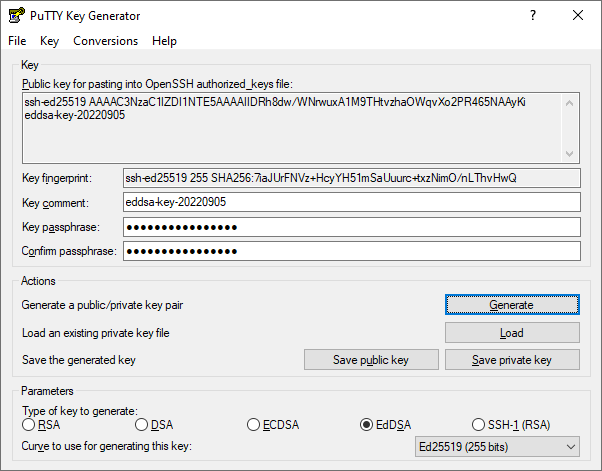
For PuTTYgen simply select EdDSA and then “Ed25519 (255 bits)” as per below. If you use PuTTY, make sure you are on version 0.81 or higher because of the ECDSA issue described above.
Common ssh-keygen options
These are the ssh-keygen options people most often look up, with an example of each:
| Option | What it does | Example |
|---|---|---|
-t |
Sets the key type: ed25519, ecdsa, rsa, ed25519-sk or ecdsa-sk. | ssh-keygen -t ed25519 |
-b |
Sets the key size in bits for RSA and ECDSA keys. It is ignored for Ed25519, which is always 256 bits. | ssh-keygen -t rsa -b 4096 |
-C |
Sets the comment on a new key. | ssh-keygen -t ed25519 -C "andrew@work-laptop" |
-c |
Changes the comment on an existing key, used together with -C and -f. It asks for the passphrase if the key has one. | ssh-keygen -c -C "andrew@new-laptop" -f ~/.ssh/id_ed25519 |
-f |
Sets the file name of the key to create or change. | ssh-keygen -t ed25519 -f ~/.ssh/id_work |
-p |
Adds, changes or removes the passphrase on an existing private key. | ssh-keygen -p -f ~/.ssh/id_ed25519 |
-a |
Sets the key derivation rounds that protect the passphrase. | ssh-keygen -t ed25519 -a 100 |
-l |
Shows the fingerprint of a key, which is useful for checking which key is which. | ssh-keygen -l -f ~/.ssh/id_ed25519.pub |
-y |
Prints the public key for a private key, if you have lost the .pub file. | ssh-keygen -y -f ~/.ssh/id_ed25519 |
-R |
Removes a host from your known_hosts file, typically after a server has been rebuilt and its host key has changed. |
ssh-keygen -R server.example.com |
How do I move from RSA to Ed25519 keys?
Moving to Ed25519 does not need a big switch-over day, because a server will accept any key listed in a user’s authorized_keys file. For each user:
- Generate an Ed25519 key on their computer, as shown above.
- Add the new public key to their
~/.ssh/authorized_keysfile on each server, alongside the existing RSA key. - Test that they can log in with the new key, for example with
ssh -i ~/.ssh/id_ed25519 user@server. - Remove the RSA key from each server once every system they use accepts the Ed25519 key.
On a handful of servers this takes a few minutes. Across dozens of users and hundreds of servers it is easy to miss a server or leave an old key behind, and a forgotten RSA key on a server is still a way in.
Can Keystash help me implement secure keys?
Keystash is an end-to-end user and SSH key management platform designed to help you and your team better manage and secure SSH keys and SSH servers. Keystash supports RSA, ECDSA and Ed25519 keys. When a user creates a key in Keystash, Ed25519 is selected by default, and Keystash only ever stores the public key. When a user uploads an existing public key, Keystash checks it and grades its strength, so weak keys such as DSA keys or RSA keys under 2048 bits are flagged.
Keystash can also help your team move from RSA to Ed25519 keys by letting each user have two SSH keys active (RSA and Ed25519) while your legacy systems are being decommissioned. The Keystash agent on each server keeps authorized_keys in sync. Once all RSA-only systems are gone you can delete the RSA keys in Keystash and they are removed from every server, with zero impact on your users’ connections.
Roll out Ed25519 keys to all your servers in 10 minutes
Free for up to 10 servers.
Keystash is ideally suited to bring visibility and control to your Linux environment for businesses of all sizes. Contact us if you would like assistance in moving your team to secure SSH keys or setting up an SSH key management tool.
Andrew Burns
Founder, Keystash Limited.Andrew has spent the last 20 years working in IT infrastructure, networks and software development and is a passionate Linux fanboy and security scholar.